Managing several business locations creates challenges that a single-location business may not face. Customer feedback can be spread across branches, review management can become difficult to coordinate, and managers may struggle to compare performance. That is why enterprise features for multi-location businesses should focus on centralized feedback collection, review management, analytics, and automation rather than simply adding more software features.
The right platform should help teams understand what customers are saying across locations while giving managers a practical way to identify issues and act on them.
What Enterprise Software Should Help Multi-Location Businesses Do
As a business grows, enterprise features for multi-location businesses should support both individual locations and the organization as a whole.
Useful features should help businesses:
Collect customer feedback consistently across locations
Monitor and manage customer reviews
Compare feedback and performance between locations
Analyze customer sentiment and recurring issues
Automate repetitive feedback and review processes
Give managers access to relevant information
Scale customer experience processes as more locations are added
These capabilities can support restaurants, retailers, hotels, healthcare providers, automotive businesses, and other multi-location organizations.
1. Centralized Customer Feedback Collection
One of the first requirements for a multi-location business is a consistent way to collect customer feedback.
Without a centralized process, one branch might use surveys while another relies on informal messages or manual follow-ups. This makes feedback difficult to compare and can leave management without a consistent view of customer experience.
A collection tool can standardize the process across locations. Trusted Optics provides feedback collection tools that support QR codes, SMS, and email surveys. This gives businesses multiple ways to request feedback based on how customers interact with each location.
For example, a restaurant could place a QR code where customers can easily scan it after their visit, while another business could use email or SMS to request feedback after a service.
The important consideration is consistency. When locations follow a common feedback process, management can review information using a more standardized approach.
2. Multi-Location Visibility
Collecting feedback is only useful if managers can understand where it comes from.
A multi-location business may need to know whether a customer experience problem affects one branch or several. It may also want to identify locations that are receiving recurring positive or negative feedback.
Trusted Optics includes multi-location management and location comparison analytics among its published capabilities.
This type of visibility can help management look at feedback at two levels:
Location level: What is happening at a specific branch?
Business level: What patterns appear across multiple locations?
This distinction matters because a problem affecting one branch may require a local response, while a recurring issue across several branches could point to a broader operational problem.
3. Analytics Dashboard for Better Decisions
Large amounts of feedback can become difficult to interpret manually.
An analytics dashboard tool gives managers a central place to review customer information and identify patterns. Instead of reading every response individually, teams can use analytics to understand recurring themes and areas that deserve attention.
Trusted Optics provides analytics dashboards along with features such as sentiment analysis, trend identification, custom reports, and location comparison analytics.
For a multi-location business, useful questions might include:
Which locations are receiving recurring complaints?
What customer issues appear most frequently?
Are certain problems limited to particular branches?
Are customer sentiment patterns changing over time?
Which locations require further investigation?
Analytics should support decision-making rather than replace it. Managers still need to consider the operational context behind the numbers and customer comments.
4. Review Management Across Locations
Managing online reviews becomes more challenging as businesses add locations. Multiple Google Business Profiles can make it harder to monitor feedback consistently.
Trusted Optics provides review management tools, including Google review routing. Satisfied customers can be directed to public Google reviews, while dissatisfied customers can share private feedback.
Before choosing a platform, confirm which review channels and workflows it supports.
5. Enterprise Automation
Manual processes become more difficult to manage as the number of locations increases.
This is where enterprise automation can help reduce repetitive work. Rather than asking employees at every location to perform the same tasks manually, businesses can use automated workflows where the software supports them.
Trusted Optics provides automation tools and automated feedback processes. It also provides real-time email and SMS alerts for negative feedback, helping relevant teams become aware of issues that may need attention.
When evaluating automation, businesses should ask specific questions rather than simply looking for the word "automation" on a feature page.
For example:
What tasks can actually be automated?
Are alerts included?
Can feedback requests be automated?
Are review-routing processes automated?
Are there limits on automated actions?
Understanding these details helps businesses determine whether automation will reduce meaningful administrative work.
6. Check Required Integrations Before Buying
Integrations can be important when enterprise software needs to work alongside an existing technology stack.
A multi-location business may already rely on accounting software, payment gateways, WhatsApp, CRM systems, or other business applications.
Before choosing a platform, make a list of the systems that need to connect with the new software.
Do not assume that an integration exists simply because it is common in the industry. Ask the provider to confirm whether the required integration is supported and what the connection involves.
The currently provided Trusted Optics product information does not specify accounting, payment gateway, or WhatsApp integrations. Businesses that depend on these systems should confirm compatibility directly before purchasing.
7. Evaluate Data Security Carefully
Customer feedback platforms can process information submitted by customers, so data handling should be part of the buying process.
Businesses should ask SaaS providers about:
Data protection practices
Access controls
Encryption
Account security
Data storage
User permissions
Security documentation
Data retention policies
Trusted Optics states that it uses secure data encryption and SSL protection on its website.
However, businesses with specific internal security or compliance requirements should request the additional documentation they need before making a purchasing decision.
This is particularly important for organizations with formal procurement processes.
8. Compare Pricing Beyond the Starting Plan
Price should be compared with your locations, feedback volume, and expected growth, not just the starting subscription.
Trusted Optics currently offers:
Basic: 2 locations and up to 1,000 feedback responses/month
Pro: 10 locations and up to 5,000 feedback responses/month
Enterprise: 25 locations and up to 25,000 feedback responses/month
Annual billing offers a 10% saving. The Enterprise plan can also include custom integrations, dedicated support, and flexible pricing.
Choose a plan based on your current usage and future location growth.
How to Evaluate a SaaS Provider
A feature list does not tell the whole story. Before adopting a platform, businesses should evaluate how well it fits their existing operations.
Ask the provider:
How many locations does the selected plan support?
What happens when more locations are added?
What is the monthly feedback limit?
What happens if that limit is exceeded?
Which integrations are currently supported?
What automation features are included?
What security information is available?
What support is available to administrators?
How much setup will be required?
What will the total cost look like as the business grows?
For migration and onboarding, businesses should also clarify what information needs to be transferred, who handles setup, and whether existing workflows need to be changed.
Trusted Optics' provided information does not specify a formal migration or onboarding service, so businesses with complex implementation requirements should confirm this directly with the provider.
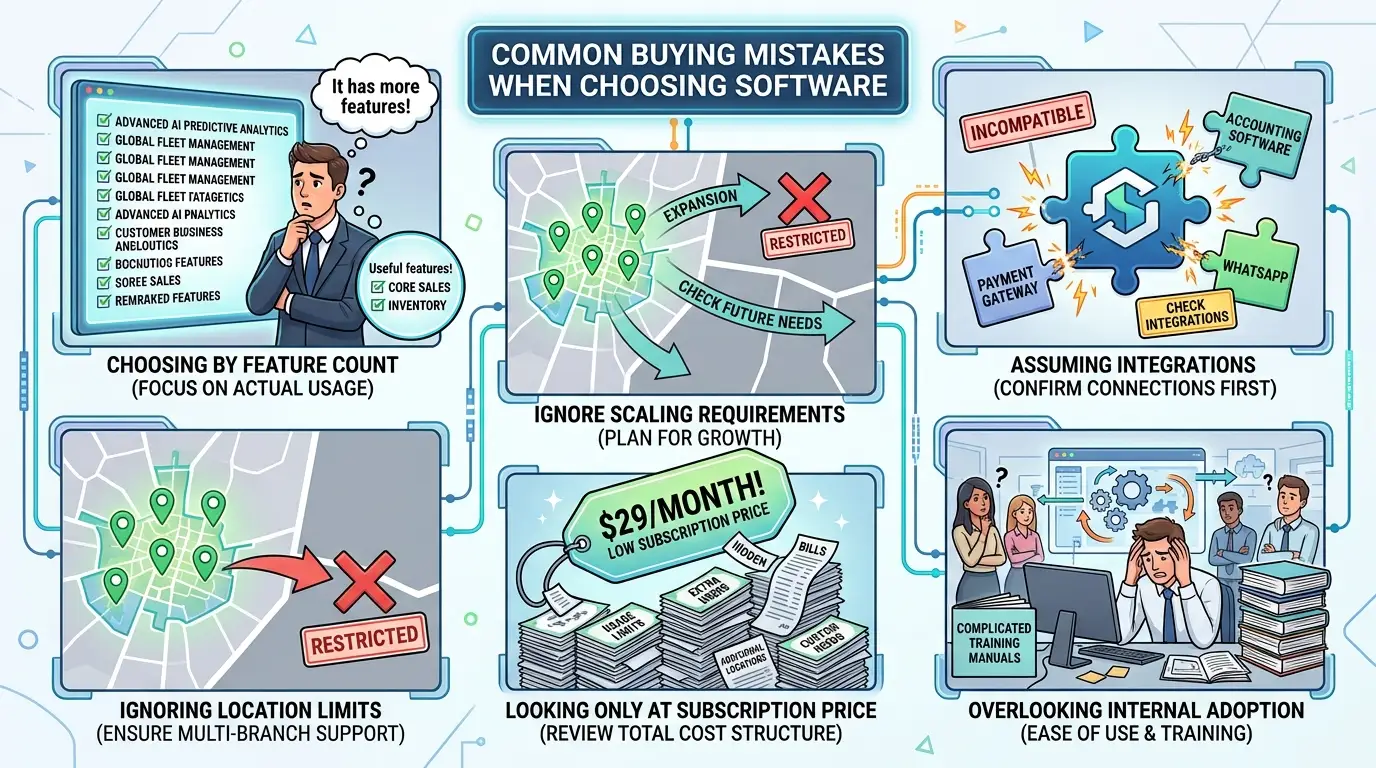
Common Buying Mistakes
Choosing software because it has many features
A long feature list does not automatically make a platform suitable. Focus on the capabilities your teams will actually use.
Ignoring location limits
A platform may work well for a small number of branches but become restrictive as the organization expands. Check current and future location requirements.
Assuming integrations
Always confirm required integrations instead of assuming that accounting software, payment gateways, WhatsApp, or other systems will connect automatically.
Looking only at subscription price
Usage limits, additional locations, and custom requirements can affect the overall cost. Review the pricing structure before committing.
Overlooking internal adoption
Even useful software can create problems if managers and employees do not understand how to use it. Consider the effort required to introduce the platform across locations.
Who Does Not Need Enterprise-Level Features?
Not every business need enterprise-level software. A single-location business or one with limited customer feedback may not require advanced analytics, automation, or multi-location management.
The right solution depends on your locations, feedback volume, operational needs, and growth plans.
FAQs
What Enterprise Features for Multi-Location Businesses are most important?
They typically include centralized feedback collection, review management, analytics, automation, and multi-location reporting.
Why is automation important for multi-location businesses?
Automation reduces repetitive tasks such as feedback requests, alerts, and review-related workflows across locations.
How can businesses compare customer feedback across locations?
An analytics dashboard can help managers review feedback trends, sentiment, and performance across individual locations.
Does every multi-location business need enterprise software?
No. The right solution depends on the number of locations, feedback volume, operational complexity, and reporting needs.
Final Thoughts
The right enterprise features for multi-location businesses should simplify feedback collection, review management, analytics, and automation across locations.
Trusted Optics combines these capabilities with multi-location functionality to help businesses manage customer insights from one platform.
If you're comparing SaaS platforms, review the plans and choose one that fits your current locations, feedback volume, and growth needs.
Author Bio
Trusted Optics is a customer feedback and review management platform that helps businesses collect feedback, manage reviews, analyze customer insights, and monitor multiple locations from one platform.
Written by
Alex Jones
Contributing writer sharing insights and expertise on customer experience and business growth.