A customer may leave your business satisfied but never return. Another may have a small complaint that your team never hears about until it becomes a negative online review. This is why finding the best ways to collect customer feedback is essential for businesses that want to improve customer experience.
Customer feedback can reveal problems that sales data cannot. A restaurant may serve quality food but have slow service. A retailer may offer good products but make returns difficult. A software company may have useful features but poor onboarding.
When businesses collect feedback at the right time and act on it, they can identify problems earlier, improve customer satisfaction, and build stronger relationships.
What Is Customer Feedback Collection?
Customer feedback collection is the process of gathering opinions, ratings, reviews, suggestions, and experiences directly from customers through surveys, QR codes, SMS, email, online reviews, website forms, and feedback software.
The goal is not simply to collect the highest number of responses. Useful feedback should help a business understand customer expectations, identify problems, and make better decisions.
Best Ways to Collect Customer Feedback
Different businesses need different feedback methods. A restaurant, online store, healthcare provider, and software company may all use different channels.
The best approach is usually to combine methods based on the customer journey.
1. Use Short Customer Feedback Surveys
Short surveys help businesses collect structured feedback about satisfaction, product quality, service, and the overall customer experience.
Keep questions focused and easy to answer. Asking too many questions can reduce response rates.
Useful questions include:
How satisfied were you with your experience?
What did we do well?
What could we improve?
Would you recommend us to others?
Expert Insight
A high number of responses does not always mean better customer insight. A short, relevant survey can provide more useful information than a long questionnaire that customers complete without much thought.
2. Use Feedback QR Codes
QR codes give customers a quick way to access feedback forms from their smartphones. Businesses can place them on receipts, tables, checkout counters, packaging, invoices, delivery packages, and reception desks.
A clear prompt like “How was your experience today?” can encourage scans. Keep the form mobile-friendly and simple, as extra steps such as account creation may reduce submissions.
3. Collect Feedback Through SMS and Email
SMS is useful for sending quick feedback requests after a purchase, delivery, appointment, or customer service interaction.
Email works well for more detailed feedback, especially when customers need time to evaluate a product or service.
The timing should match the experience.
A customer can usually rate delivery immediately, but they may need several days to properly evaluate a product.
4. Ask for Feedback After Important Touchpoints
Request feedback soon after key interactions, such as a purchase, delivery, support resolution, appointment, or service completion.
Specific questions usually produce more actionable insights than general ones. For example, “How easy was it to complete your purchase?” is more useful than simply asking, “How do you feel about our business?”
5. Collect Online Reviews
Online reviews support customer feedback and reputation management, but they should not be the only feedback channel. Some customers prefer sharing feedback privately rather than posting publicly.
A practical process is:
Customer completes a purchase or service.
Business requests feedback.
Customer shares their experience.
The business reviews the response and follows up when needed.
Satisfied customers may be invited to leave a public review.
This approach encourages genuine feedback while giving businesses a chance to address concerns.
6. Use Website and Social Media Feedback
Website feedback forms can collect product suggestions, service complaints, and usability feedback.
Social media is also an important source of customer insight. Customers often share questions, complaints, and opinions through comments, direct messages, and brand mentions.
However, businesses should not rely on social media alone.
Feedback from different channels should be organized so teams can identify repeated problems and customer trends.
7. Use Customer Feedback Collection Tools
As a business grows, feedback can become scattered across email, SMS, social media, online reviews, and website forms.
Collection tools can help businesses organize feedback from different channels and create a more consistent process.
This can be especially useful for businesses with multiple locations or large customer volumes.
For businesses managing reviews, surveys, feedback, and reputation in one process, customer review management software can provide more structured tools for collection, monitoring, automation, and reporting.
How to Choose the Right Feedback Method
The right method depends on your customer journey and business goals.
Consider Customer Behavior
Where do customers naturally interact with your business?
If they regularly receive SMS notifications, SMS feedback requests may be practical. If they visit a physical location, QR codes may be more convenient.
Consider Timing
Customers should be asked for feedback when the experience is still fresh.
However, the right timing depends on the product or service. Immediate feedback may work for customer support, while product feedback may require more time.
Reduce Customer Effort
A feedback process should be:
Mobile-friendly
Quick to complete
Easy to understand
Free from unnecessary steps
Every additional step can reduce participation.
Manual Feedback vs Automated Feedback Systems
Manual feedback collection is easy to start and may work well for small businesses.
Manual Collection
Pros:
Simple to begin
Low initial cost
Flexible
Useful for direct customer conversations
Cons:
Difficult to scale
Feedback may become scattered
Follow-ups can be missed
Trends are harder to identify
Automated Collection
Pros:
Consistent feedback requests
Easier follow-ups
Centralized data
Better campaign tracking
Useful for multiple locations
Cons:
Requires proper setup
Poor timing can annoy customers
Human follow-up is still necessary
Expert Opinion
Automation should reduce repetitive work, not remove the human element.
An automated survey may be convenient for collecting feedback. However, a serious complaint still requires a thoughtful human response.
Using Analytics, Automation, and Reputation Management Tools
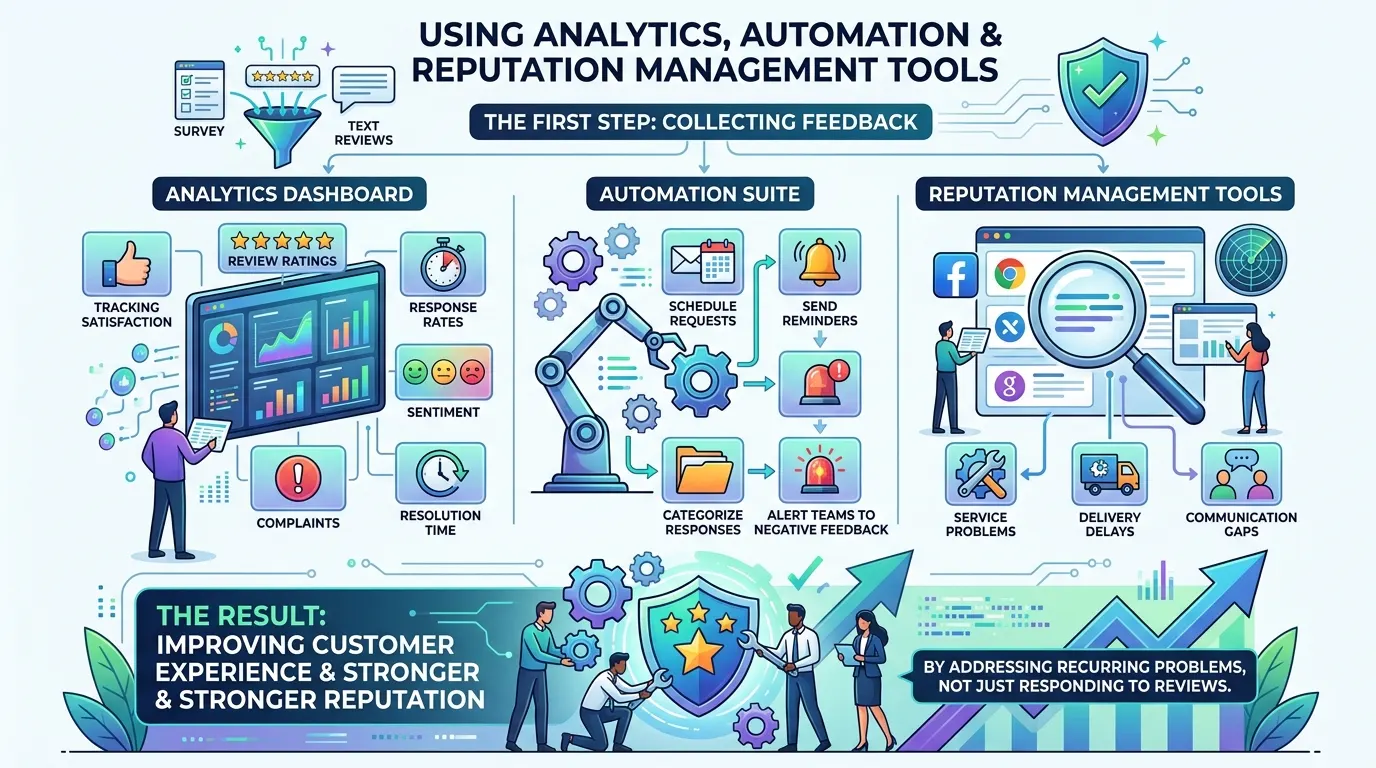
Collecting feedback is only the first step. An analytics dashboard helps businesses track satisfaction, review ratings, response rates, sentiment, complaints, and resolution time.
An automation suite can simplify feedback workflows by scheduling requests, sending reminders, categorizing responses, and alerting teams to negative feedback.
Reputation management tools help monitor customer opinions across online platforms and identify issues such as service problems, delivery delays, and communication gaps.
By addressing recurring problems—not just responding to reviews—businesses can improve customer experience and build a stronger reputation.
How to Turn Feedback into Better Customer Experience
Collecting feedback does not automatically improve customer experience.
Businesses need a process for turning feedback into action:
Collect: Gather feedback from important customer touchpoints.
Organize: Group responses by topic, location, or journey stage.
Identify patterns: Look for repeated issues.
Prioritize: Focus on problems with the greatest customer impact.
Take action: Assign responsibility for improvements.
Measure again: Check whether customer satisfaction improves.
This creates a continuous feedback loop.
Expert Tips for Better Feedback Collection
Ask focused questions: Each question should support a clear business decision.
Track repeated issues: Recurring complaints often reveal deeper operational problems.
Compare locations: Multi-location businesses should analyze feedback by branch.
Review negative feedback: Complaints can reveal opportunities for improvement.
Close the feedback loop: Let customers know when their feedback leads to meaningful changes.
Common Customer Feedback Mistakes
Businesses often make these mistakes when collecting customer feedback:
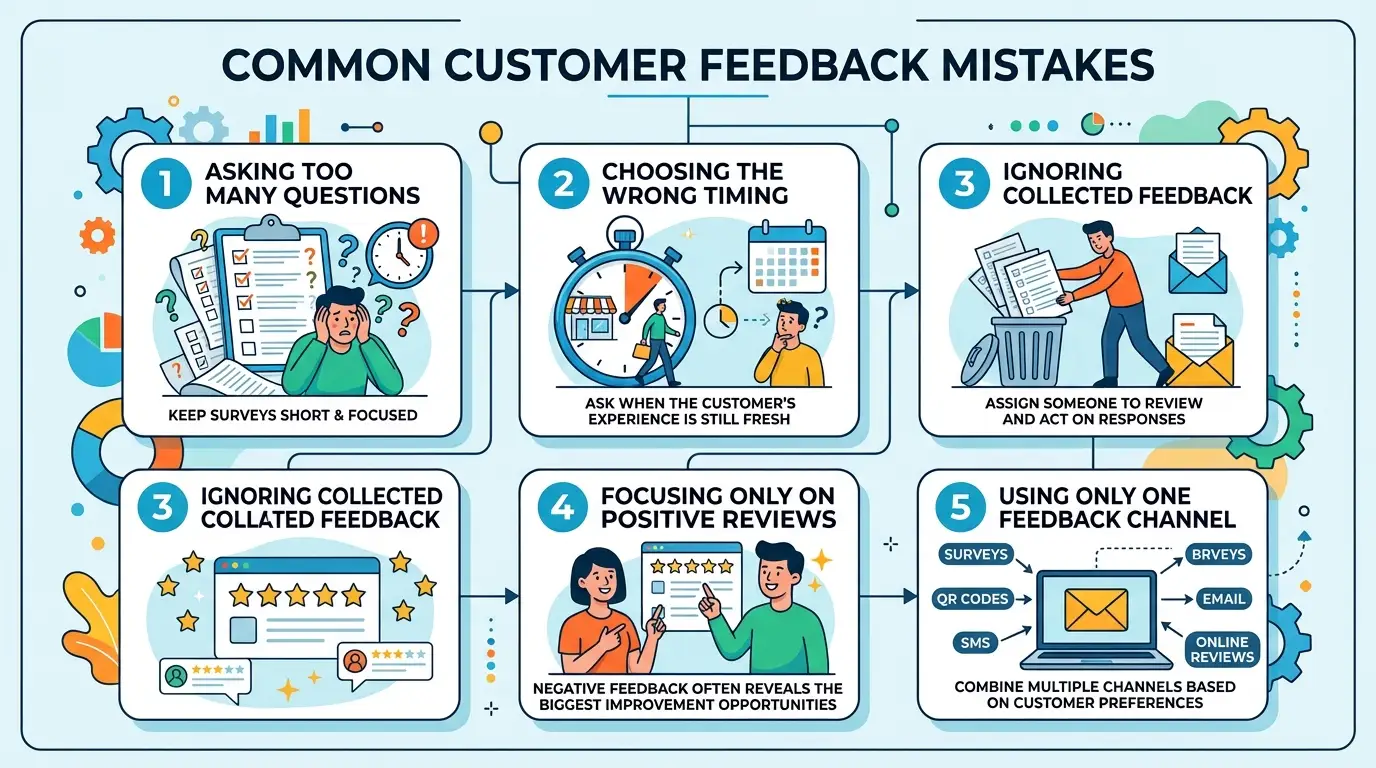
Asking Too Many Questions: Keep surveys short and focused.
Choosing the Wrong Timing: Ask when the customer’s experience is still fresh.
Ignoring Collected Feedback: Assign someone to review and act on responses.
Focusing Only on Positive Reviews: Negative feedback often reveals the biggest improvement opportunities.
Using Only One Feedback Channel: Combine surveys, QR codes, SMS, email, and online reviews based on customer preferences.
Customer Testimonials
Organizing customer feedback helped us identify recurring concerns much faster.
— Retail Business Manager
A simple feedback process helped us understand what customers valued and where we needed to improve.
— Service Business Owner
Looking at feedback patterns gave us a clearer view of the customer journey.
— Operations Manager
Frequently Asked Questions
What are the best ways to collect customer feedback?
The best methods include surveys, QR codes, SMS, email, website forms, online reviews, social media, and customer feedback software.
How can businesses collect feedback online?
Businesses can use online surveys, website forms, email, SMS links, review requests, social media, and feedback platforms.
What is the best tool for collecting customer feedback?
The right tool depends on your business size, customer channels, automation requirements, and reporting needs.
How often should businesses ask for feedback?
Businesses should request feedback after meaningful interactions without contacting customers so frequently that they feel interrupted.
How does feedback improve customer experience?
Feedback helps businesses identify problems, understand customer expectations, improve services, and measure the results of changes.
Conclusion
The best ways to collect customer feedback depend on your customers and business needs. Surveys, QR codes, SMS, email, online reviews, and automated tools can help collect valuable insights.
However, feedback only creates value when businesses review responses, identify recurring issues, and take action. With Trusted Optics, businesses can manage feedback, reviews, reputation, and customer insights more effectively to improve the customer experience.
About the Author
This article was prepared by the Feynix Solution content team for Trusted Optics. The team focuses on customer feedback management, online reputation, customer experience, review collection strategies, and feedback technology for modern businesses.
Written by
Alex Jones
Contributing writer sharing insights and expertise on customer experience and business growth.